Import Azure Tenant
Import Azure Tenant into Guardrails
Proper setup in the Azure tenant is required for import of an Azure Tenant into Guardrails.
All child resources of the Azure Tenant will be discovered and subsequently entered into the Guardrails CMDB.
While you can import an Azure Tenant at the Turbot level, it is recommended that you import accounts into Guardrails Folders, as it provides greater flexibility and ease of management. Define a Folder hierarchy prior to import.
Import Azure Tenant via Guardrails Console
Login to Guardrails workspace console in with Turbot/Admin permissions, select the CONNECT card in the top right corner. Select Azure from the panel.
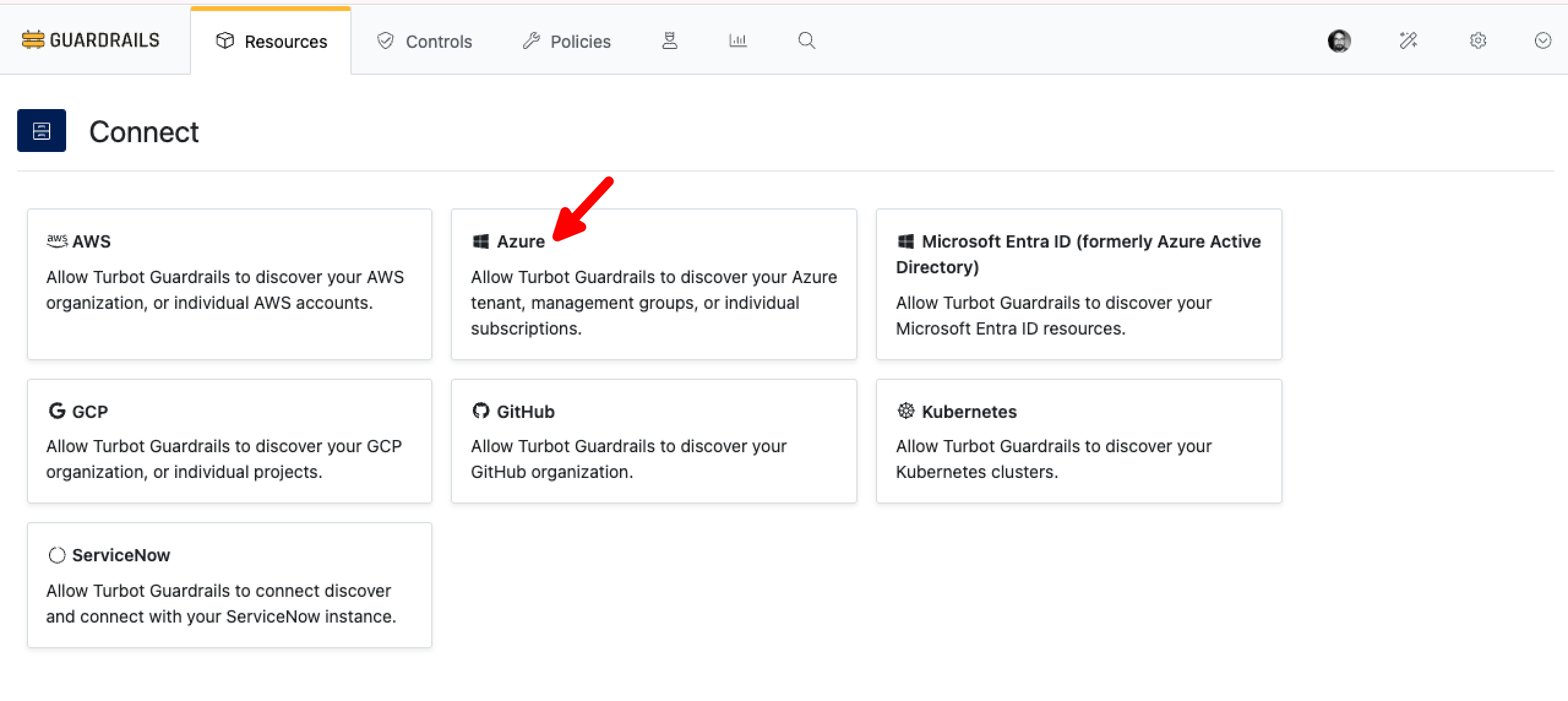
Provide the details as below:
- Select Choose your folder dropdown menu to select the folder where you would like to import your tenant.
- Enter the Tenant ID.
- Client ID and Client Key (secret) in
Client details. - Provide Environment from the dropdown list.
- Provide YAML list of subscription or management group IDs.
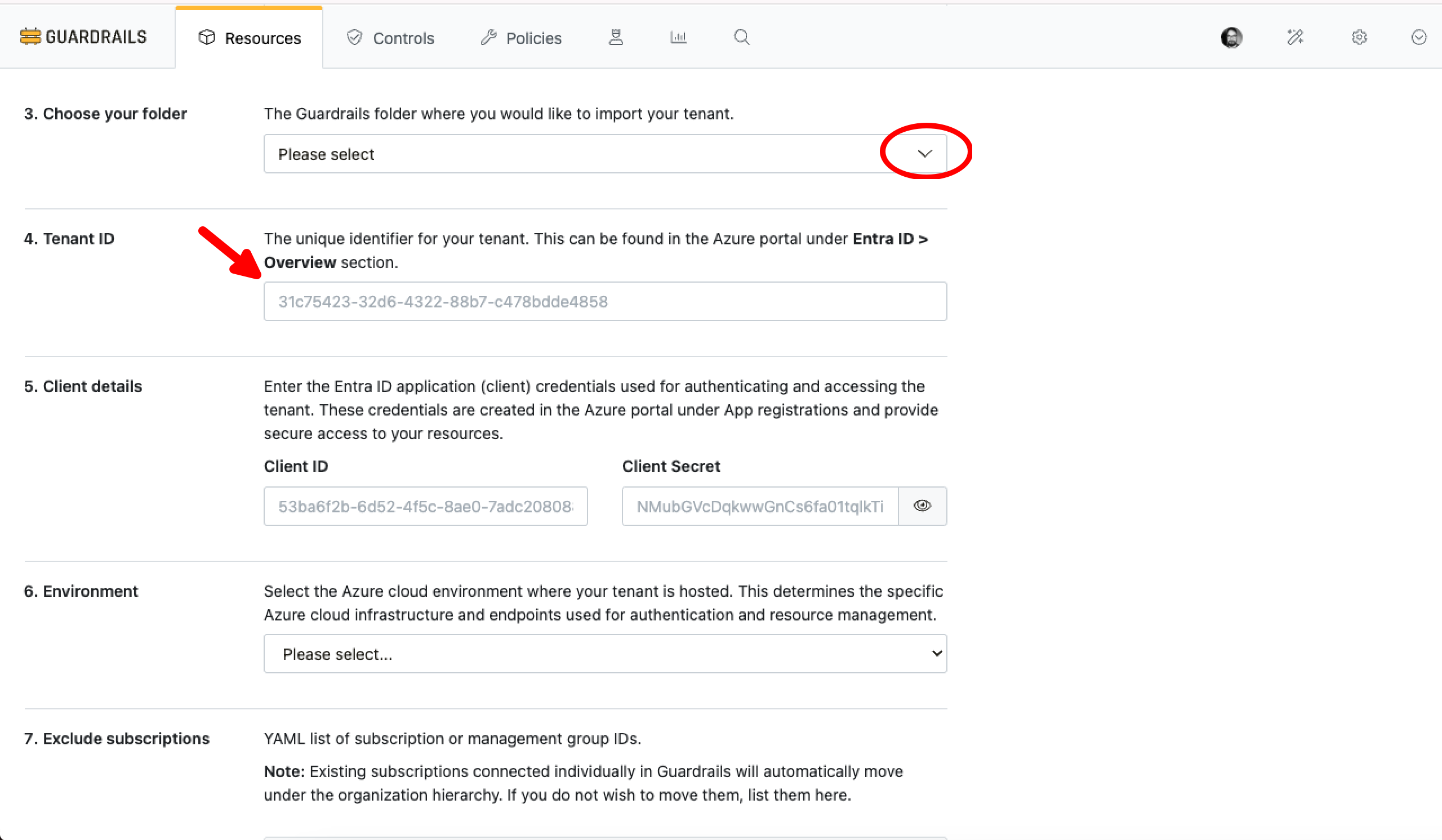
Select Connect.
CMDB and Discovery controls are enabled by default and Guardrails will begin discovering the resources in the Azure Tenant. Resources will start appearing right away, and resource discovery will continue to run in the background.
Management Group Event Pollers
Guardrails uses Management Group event pollers to detect new, updated or deleted subscriptions in the management group. Management Group event pollers are enabled by default. No action is required.
Import Tenant via Terraform
Administrators can easily import tenant using Terraform. If your Terraform environment has not been setup, head on over to the Terraform Setup Page.
# Create the Azure > Tenant resource in Guardrails
resource "turbot_resource" "tenant_resource" {
  parent = var.parent_resource
  type   = "tmod:@turbot/azure#/resource/types/tenant"
  akas   = ["azure:///tenants/your tenant id"] //highlight-line
  metadata = jsonencode({
    "azure" : {
      "tenantId" : "your tenant id" //highlight-line
    }
  })
  data = jsonencode({
    "id" : "your tenant id" //highlight-line
  })
}

# Set the credentials for the Tenant via Guardrails policies

resource "turbot_policy_setting" "environment" {
  resource = turbot_resource.tenant_resource.id
  type     = "tmod:@turbot/azure#/policy/types/environment"
  value    = "Global Cloud"
  # value    = "US Government"
}

resource "turbot_policy_setting" "clientKey" {
  resource = turbot_resource.tenant_resource.id
  type     = "tmod:@turbot/azure#/policy/types/clientKey"
  value    = "{Guardrails application client key}"
}

resource "turbot_policy_setting" "clientId" {
  resource = turbot_resource.tenant_resource.id
  type     = "tmod:@turbot/azure#/policy/types/clientId"
  value    = "{Guardrails application client id}" //highlight-line
}

resource "turbot_policy_setting" "tenantId" {
  resource = turbot_resource.tenant_resource.id
  type     = "tmod:@turbot/azure#/policy/types/tenantId"
  value    = "{tenant id}" //highlight-line
}