Multi-Region Deployment
Multi-Region Deployment
1. Introduction
1.1 Purpose
This document outlines the setup plan for deploying the Turbot Guardrails application using the Tier 3 architecture. The objective is to ensure high availability, minimize downtime, and reduce data loss in the event of a disaster by utilizing a multi-region and multi-availability zone (AZ) deployment strategy.
1.2 Scope
This setup applies to all production workloads deployed under the Tier 3 architecture, guaranteeing high availability and fast recovery.
1.3 Target Audience
This guide is intended for Guardrails Administrators with experience in AWS cloud infrastructure management and Guardrails deployment. Familiarity with database recovery and restoration processes is beneficial.
2. Disaster Recovery Objectives
| Objective | Definition |
|---|---|
| Recovery Time Objective (RTO) | 2 Hours |
| Recovery Point Objective (RPO) | 2 Hour |
| Availability | 99.9% |
| Use Case | Production deployments requiring rapid disaster recovery |
3. Tier 3 Deployment Architecture
3.1 Overview
The Tier 3 architecture enhances resilience by deploying a standby environment in a secondary AWS region. The primary and standby environments adhere to the following principles:
- Installation of TEF, TED, and TE will follow the steps outlined in the main installation guide.
- Below is a list of differences or key considerations for installations where multi-region disaster recovery (DR) is required.
3.2 Architecture Diagram
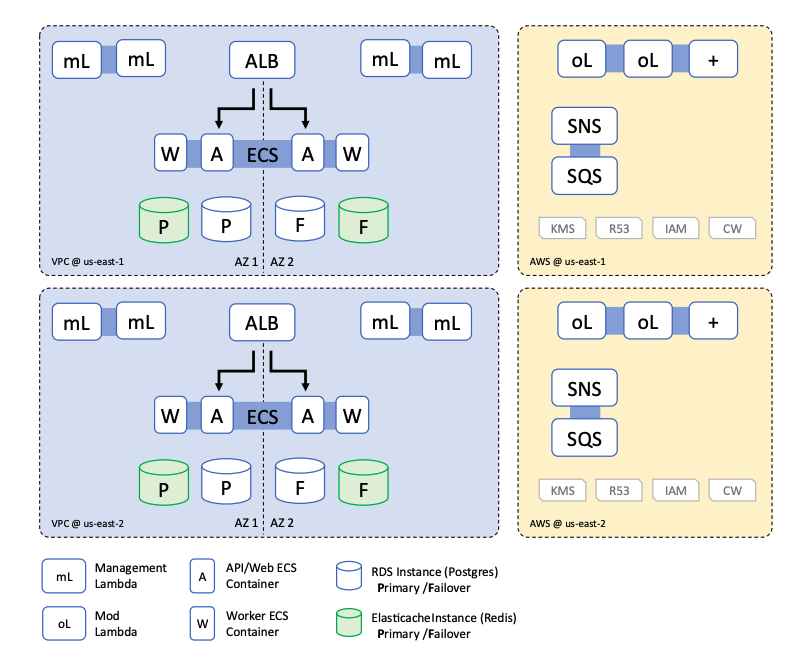
4. Prerequisites
4.1 Glossary
- Primary Region: The main region where Turbot Guardrails is installed or will be installed. This region acts as the active environment.
- Disaster Recovery (DR) Region: The secondary region where the workspace will be failed over in case of a disaster.
4.2 Assumptions
This guide assumes the following setup for deploying Turbot Guardrails:
- A predefined VPC (not created by Turbot Guardrails).
- DNS records are not managed by Turbot Guardrails.
- IAM roles are not provisioned by Turbot Guardrails.
- API Gateway with an internal load balancer is used.
4.3 Key Considerations
VPC Configuration
A predefined VPC with subnets mirroring the primary region must be set up in the DR region.
SSL Certificate
- Ensure the certificate is valid and available in both primary and DR regions.
- If the certificate includes a wildcard domain (e.g.,
*.cloudportal.company.com), no additional changes are required. - Otherwise, the certificate should be configured to trust the following domains for API Gateway:
gateway.cloudportal.company.com(Primary region)gateway-dr.cloudportal.company.com(DR region)
Workspace Configuration
- A single additional workspace will be installed in the DR region.
- The domain for the DR workspace will follow the pattern:
{workspace_name}-dr.cloudportal.company.com.
Product Version Requirements
Both regions must run the following minimum versions:
- TEF: 1.66.0
- TED: 1.45.0
- TE: 5.49.0
- Turbot Resource Name Prefix should be identical in both regions. Defaults to
turbot.
4.4 Differences Between Primary and DR Regions
| Configuration | Primary Region | DR Region |
|---|---|---|
| TEF Configuration | • SSL certificate must cover required domains | • SSL certificate must cover required domains |
• "API Gateway prefix" parameter set to gateway |
• "API Gateway prefix" parameter set to gateway-dr |
|
• "Guardrails multi-region KMS Key Type" set to Primary |
• "Guardrails multi-region KMS Key Type" set to KMS key ARN from primary region (alias: turbot_guardrails, prefixed with mrk-) |
|
• Manual creation of custom domain names (gateway.cloudportal.company.com) for API Gateway |
||
| TED Configuration | • Database name must be identical in both regions | • Database name must be identical in both regions |
| RDS Configuration | • Manual configuration of cross-region RDS DB snapshots with appropriate retention policies | - |
[!WARNING] When setting up TEF in the DR region, ensure a smooth deployment to avoid rollback issues. If a replica key is created and a rollback is required, the replica key cannot be deleted immediately and will be subject to a 7-day retention period unless removed with AWS Support assistance. You can create only one replica of each primary key in each AWS Region.
If necessary, complete the TEF setup in the DR region by setting the Guardrails multi-region KMS Key Type (under Advanced - Deployment) to Primary. Once the setup is successfully completed, update the parameter to Replica and delete the multi-region key created in the DR region.
4.5 Workspace Deployment in DR Region
- Create a test workspace in the DR region.
- Install the same set of mods as in the primary region to ensure consistency.
Context
Creating a test workspace in the DR region is essential because manually installing mods during an actual disaster recovery scenario can be time-consuming and might lead to delays exceeding your Recovery Time Objective (RTO) and Recovery Point Objective (RPO). By preparing a sandbox workspace in advance in the DR region, you can install mods proactively using the same automation methods (such as pipelines, Terraform scripts, or AutoMod updates) and schedules employed for your primary workspace. This ensures that your DR workspace remains continuously up-to-date and can quickly and reliably take over workloads if your primary workspace experiences downtime.
5. Implementation Steps
5.1 Setting Up Cross-Region Database Backup
- Navigate to the AWS RDS Service in the Primary region.
- Click on "Automated backups".
- Under the "Current Region" tab, select the Turbot Guardrails database (e.g.,
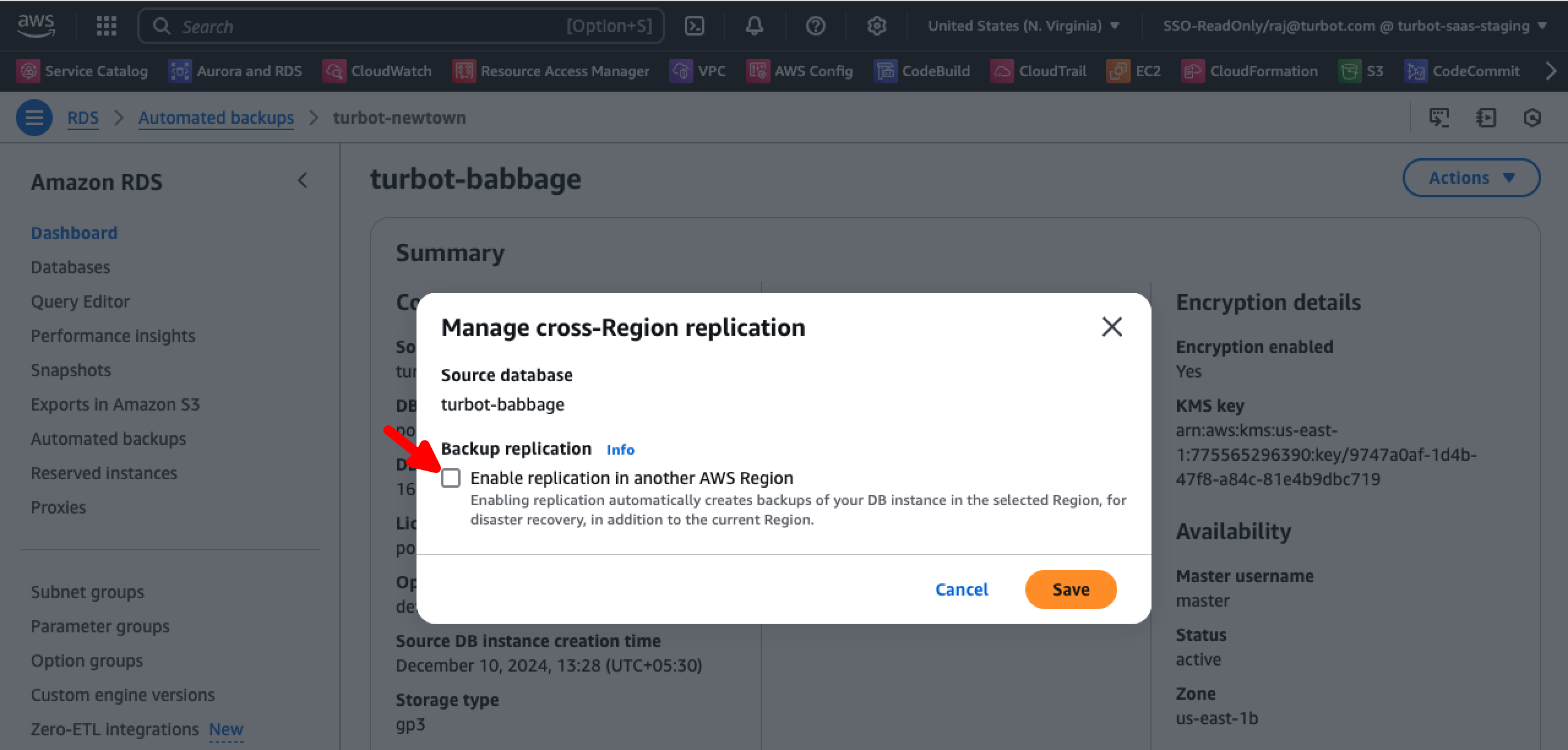
turbot-newton). - Select the Guardrails database, click on the "Actions" dropdown button, and choose "Manage cross-Region replication".
- A "Manage cross-Region replication" window will open.
- Check the "Enable replication in another AWS Region" option.
- Fill in the necessary details in the form:
- Destination Region: Select the "DR region".
- Replicated backup retention period: Choose the appropriate retention period in days.
- AWS KMS Key: Select the encryption key used for the Turbot database in the DR region. Typically, this follows the format "turbot_databasename" (e.g.,
turbot_newton). - Validate the KMS Key ID: Navigate to the KMS service in the DR region to confirm the correct key.

- Click Save to complete the setup.
- Navigate to the "Replicated" tab and verify that the database is listed under "Replicated backups".
5.2 Configuring Workspaces in the Primary Region
-
Make sure to set the following policies on the Guardrails workspace:
-
Turbot > Workspace > Gateway Domain Name: Fully qualified domain name of the publicly accessible gateway to the workspace - for example,gateway.turbot.acme.com. Set to the domain name only, do not include protocol or path information. -
Turbot > Workspace > Domain Name: Fully qualified domain name of the workspace - for example,console.turbot.acme.com. Set to the domain name only, do not include protocol or path information.
5.3 Configuring API Gateway Custom Domain Name in the DR Region
To ensure seamless failover in the DR region, you need to configure the "API Gateway Custom Domain Name".
- Open the AWS API Gateway service in the "DR region".
- Verify that the custom domain
gateway-dr.cloudportal.company.comis already present. - Click on "Add domain name".
- Enter the same domain name as in the primary region:
gateway.cloudportal.company.com. - Configure the following settings:
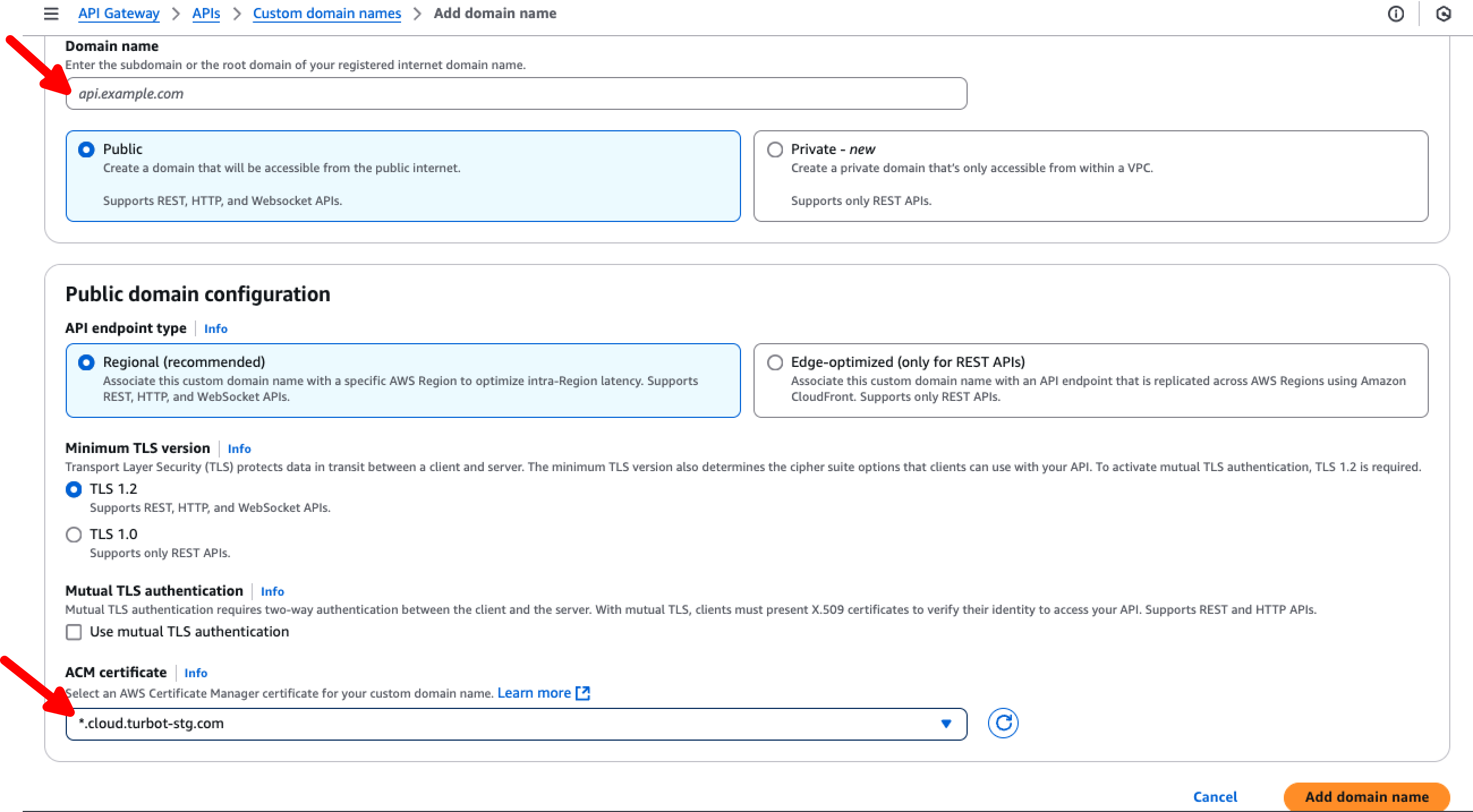
- Type: Public
- API endpoint type: Regional
- Minimum TLS version: TLS 1.2
- ACM Certificate: Select the ACM Certificate created for Turbot Guardrails. This certificate should be configured to trust both
gateway.cloudportal.company.comandgateway-dr.cloudportal.company.com. - Click "Add domain name" to finalize the setup.
- Once created, navigate to the "Custom domain name" settings and open the "API mappings" tab.
- Click on "Configure API mappings", then select "Add new mapping".
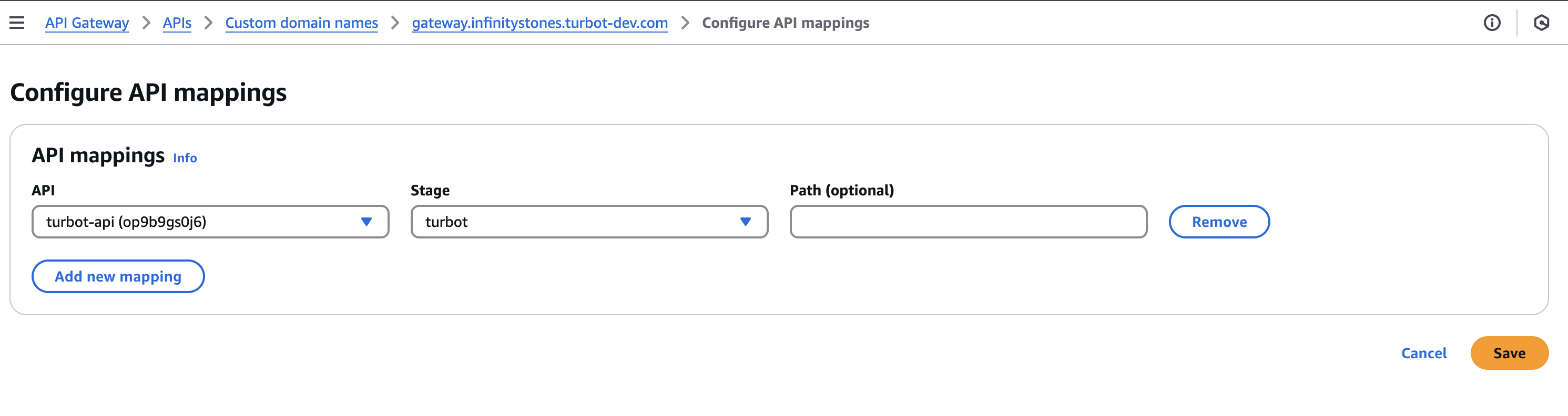
- Set the following values:
- API: Select
turbot-api. - Stage: Choose
turbot. - Path (optional): Leave blank.
- API: Select
- Click Save to apply the changes.
5.4 Configuring DNS records
Ensure that the following DNS records are correctly configured to route traffic appropriately:
-
API Gateway DNS Record:
The domain
gateway.cloudportal.company.comshould have an A record pointing to the API Gateway endpoint in the primary region. The API Gateway endpoint typically follows the format:abcdefghij.execute-api.us-east-1.amazonaws.com -
Workspace Console DNS Record:
The domain
console.cloudportal.company.comshould have a CNAME record pointing to the internal load balancer DNS name in the primary region. This internal load balancer DNS name generally follows the format:internal-turbot-5-49-0-lb-1234567890.us-east-1.elb.amazonaws.com
Additional Assistance
Turbot Support is happy to consult with Enterprise customers to help determine a strategy to manage these scenarios. Contact us at [email protected].